Music to Video
One song. A few pictures. Your story.
Picture sequence0 pictures
Full picture, black in empty areas
Transform Soundtrack Music and Photo Memories into Music to Video Productions
Turn individual photo collections plus favorite music recordings into engaging music to video stories. Our browser based music to video builder connects still pictures with stereo music acoustics smoothly. Convert and sync music to dynamic pictures effortlessly. Every creator easily produces cinematic music to video compositions without paying subscription fees or uploading confidential music files. Experience instant music to video rendering right inside your web browser.
Align each photograph with exact music beat markers. Our music to video editor recalculates remaining frame boundaries automatically whenever music durations change.
Smooth half-second crossfades blend sequential frames naturally, delivering broadcast quality music to video visual continuity across diverse picture aspect ratios while music plays.
Sound decoding and MP4 muxing execute within local device memory. Zero music media bytes transfer across external networks during music to video creation.
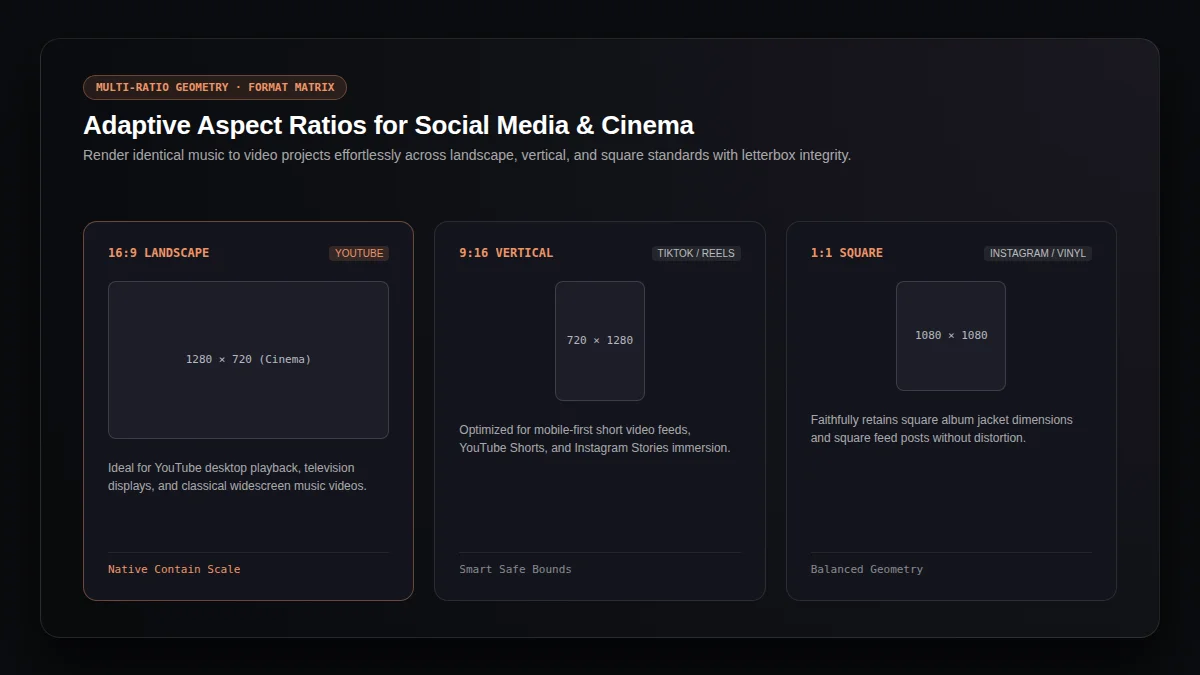
Flexible Aspect Ratio Presets for Modern Music to Video Distribution
Distribute your music to video creations across desktop streaming channels, vertical social feeds, and square portfolio layouts with letterbox fidelity and clear music audio.
16:9 Landscape Cinema
High definition 1280x720 canvas tailored for YouTube desktop playlists, widescreen displays, and traditional music to video showcases.
9:16 Vertical Mobile Feed
Vertical 720x1280 dimensions optimized for TikTok clips, YouTube Shorts, and Instagram Reels music to video viewing trends.
1:1 Square Album Standard
Balanced 1080x1080 framing preserving authentic album artwork aesthetics and square social feeds within music to video projects.
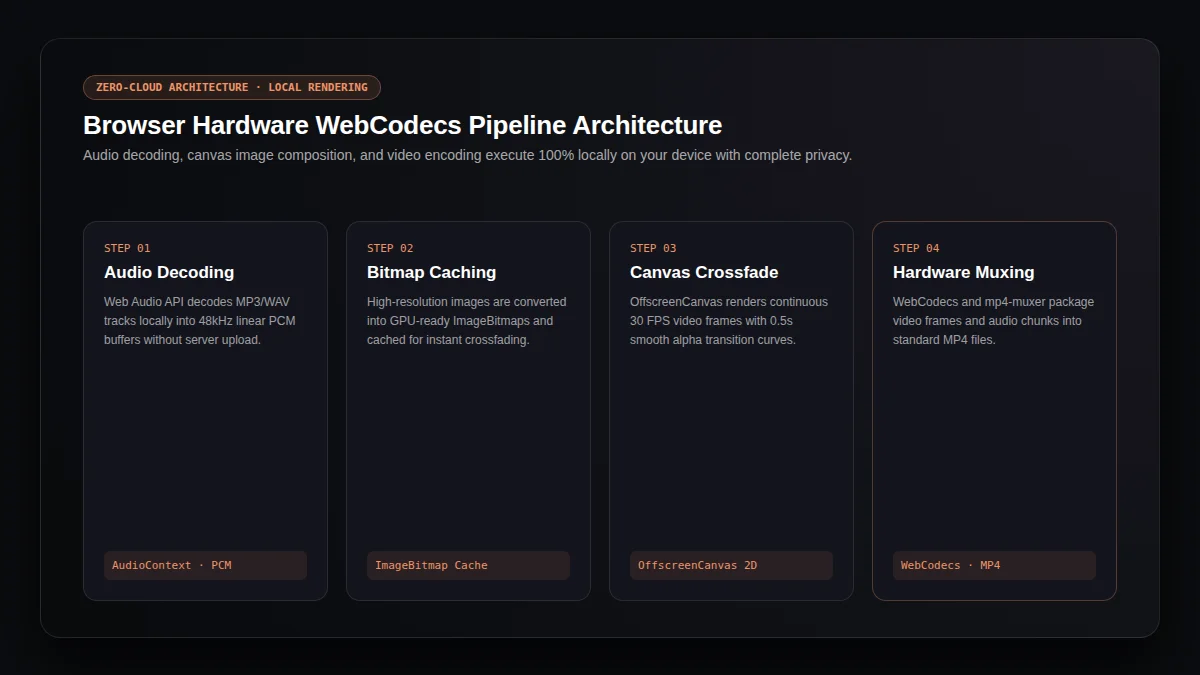
Under the Hood: High Performance Web Audio and Canvas Music to Video Pipeline
Engineered upon modern W3C standards, our music to video engine combines hardware accelerated OffscreenCanvas rendering, Web Audio linear PCM decoding, and native WebCodecs MP4 container muxing directly in browser memory for synchronized music playback.
Decodes MP3 and WAV sound buffers into 48kHz stereo music streams with microsecond clock precision for responsive music to video synchronization.
Converts input picture files into GPU texture buffers beforehand, preventing frame stutters while rendering continuous 30 FPS music to video sequences.
Computes smooth alpha interpolation across adjacent slide bitmaps, guaranteeing clean letterbox edges throughout music to video generation.
Encodes progressive H.264 visual chunks and AAC music streams directly into standard MP4 files ready for instant music to video download.
How for Building Your Music to Video Production in Three Steps
- 01
Load Music Track
Pick an MP3 or WAV music track from your device. Our music to video editor measures total acoustic length instantly without uploading files.
- 02
Arrange Image Sequence
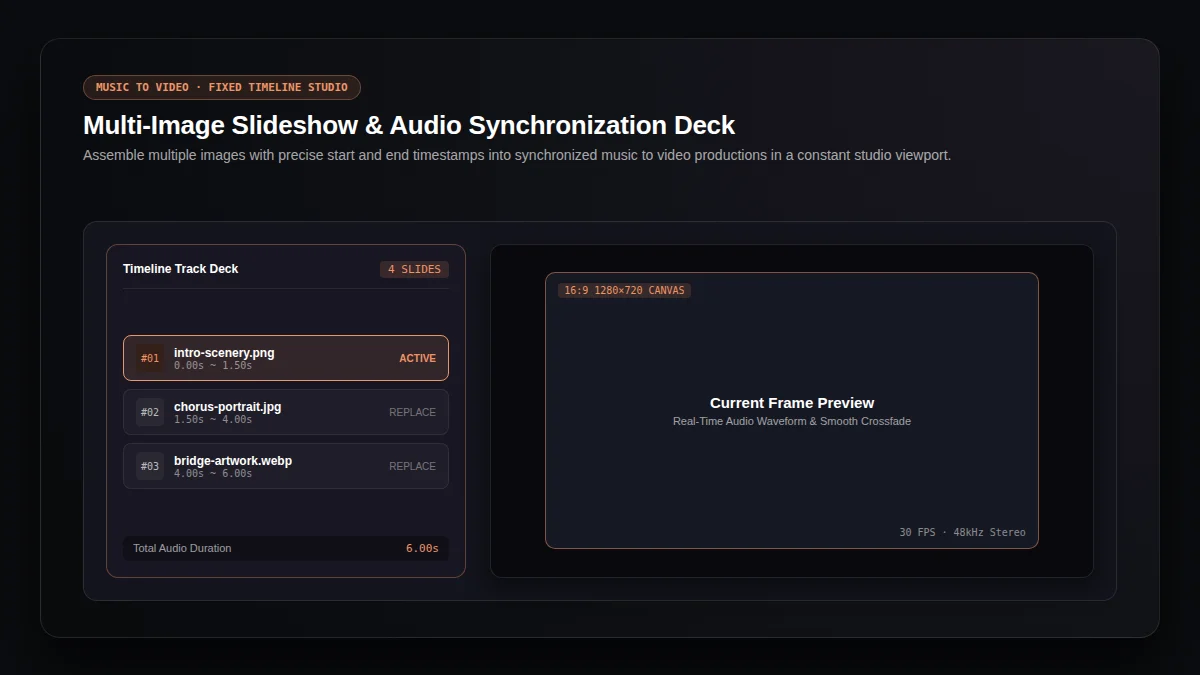
Upload photos and set chronological timestamps in our compact timeline studio deck. Our music to video workspace balances display durations neatly alongside music rhythms.
- 03
Preview and Export Output
Run realtime canvas preview playback, select your target aspect ratio, and trigger hardware accelerated music to video export for immediate download.
Practical Workflows and Creative Music to Video Ideas
Lyrical Storytelling and Photo Montages
Combine memorable travel photographs or wedding snapshots with meaningful acoustic music songs. Crafting a personal music to video montage turns scattered photo albums into cohesive cinematic experiences that family members cherish alongside background music.
Musician Teasers and Social Promotion
Independent music artists utilize our music to video studio for announcing upcoming single releases on social media. Pairing teaser sound snippets with concept artwork delivers eye catching music to video clips without complex editing software.
Podcast Highlights and Audio Quotes
Content creators transform podcast sound bites and audio interview segments into visual music to video snippets. Adding relevant speaker graphics expands discoverability across online channels while music enhances emotional delivery.
Technical Specifications for Music to Video Browser Export
Frequently Asked Questions About Music to Video Creation
What is the best way for converting music to video online?
Using our dedicated browser engine is the easiest path. Simply upload your music track and image sequence; our music to video creator renders synchronized MP4 files locally within seconds.
Are my music files and images uploaded for external servers?
No. Our music to video creator operates strictly inside your browser environment using Web Audio and WebCodecs. All pictures and sound files stay confidential on your personal machine.
Can I customize how long each picture appears?
Yes. Our timeline interface provides precise timestamp controls for every slide. Adjusting end times lets you synchronize specific photographs with distinct music to video rhythm changes.
Does this music to video creator support multiple aspect ratios?
Yes. You can switch freely between 16:9 widescreen, 9:16 vertical smartphone layout, and 1:1 square canvas presets for preparing your music to video project across various platforms.
Is there a limit on how many pictures I can include?
You can add as many photos as your device memory allows. Our music to video deck keeps all slides organized inside a compact viewport for convenient previewing and replacing.
Is this music to video tool free for creators?
Yes, this music to video tool is completely free with no watermark, no hidden export fees, and no account registration required for online music creation.
Explore More AI Audio & Media Production Tools
Song Video Visualizer
Turn complete songs into animated music clips with dynamic effects.
Audio Visualizer Studio
Convert any audio recording into visual waveform music presentations.
Album Cover Visualizer
Pair uncropped album art with reactive sound wave spectrums.
Lyrics Video Maker
Synchronize scrolling lyrics with songs for karaoke style clips.
AI Music Video Generator
Generate cinematic AI music videos driven by song beats and moods.
AI Music Generator
Compose original royalty free music tracks using generative AI models.
AI Cover Generator
Create expressive vocal song covers with customized voice models.
MP3 Media Converter
Fast container conversion turning audio files into playable format.