STUDIO CONSOLE · EXCERPT TRIMMER · BROWSER EXPORT
Song to Video: Turn Any Song into a Video Online
Transform song excerpts into social-ready video clips with custom cover art and reactive waveforms. 100% free, private in-browser export.
Why Do Creators Turn a Song to Video for Social Feeds?
Sharing a song on social platforms requires a video stream because audio files cannot play directly in feeds. Our song to video converter bridges this gap by turning any song into compelling visual content with animated waveforms and artwork. Moving from song to visual clips gives every release the professional aesthetic it deserves across YouTube, TikTok, and Instagram feeds.
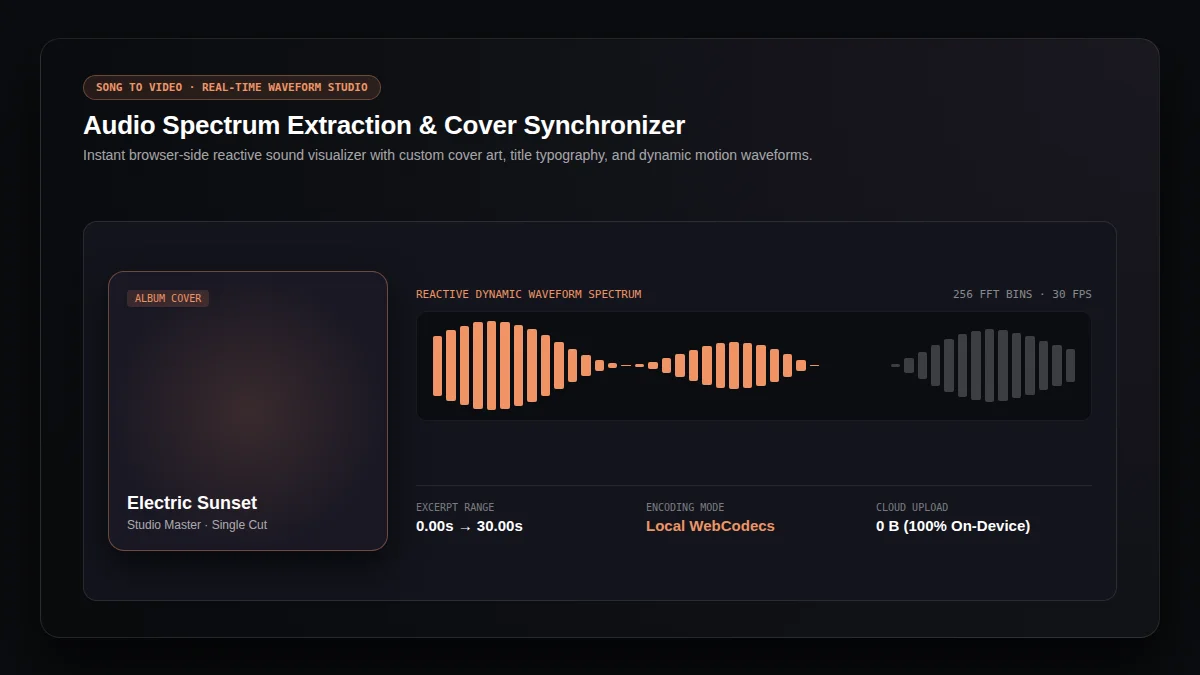
Extract song audio frequencies in real time to generate animated waveform bars. Every song render reacts dynamically to musical rhythm, bass energy, and vocal phrases.
Attach high-resolution album covers or artist portraits. The song to video visualizer frames artwork cleanly with subtle glow effects and balanced contrast.
Select any song excerpt with exact start and end boundaries. Moving from song to shareable highlights captures a memorable chorus, melodic bridge, or catchy intro.
Which Aspect Ratio Should You Choose for Song to Video?
Every social channel uses specific screen proportions. When you create a song to video asset, selecting the right canvas format ensures artwork and waveform graphics sit safely away from platform buttons and overlays. Choose from three production presets for your song export.
16:9 Cinema Landscape (1280 × 720)
Ideal for YouTube widescreen playback, desktop browser players, and portfolio presentations. This format provides generous horizontal space for song waveforms and artist titles.
9:16 Vertical Reel & Short (720 × 1280)
Designed for TikTok, Instagram Reels, and YouTube Shorts. Elements remain inside verified mobile safe zones so channel handles and reaction buttons never obscure your song to video content.
1:1 Universal Square (1080 × 1080)
Built for Instagram feed posts and music discussion channels. The balanced square framing highlights square song cover art and central animated waveforms in an iconic visual layout.
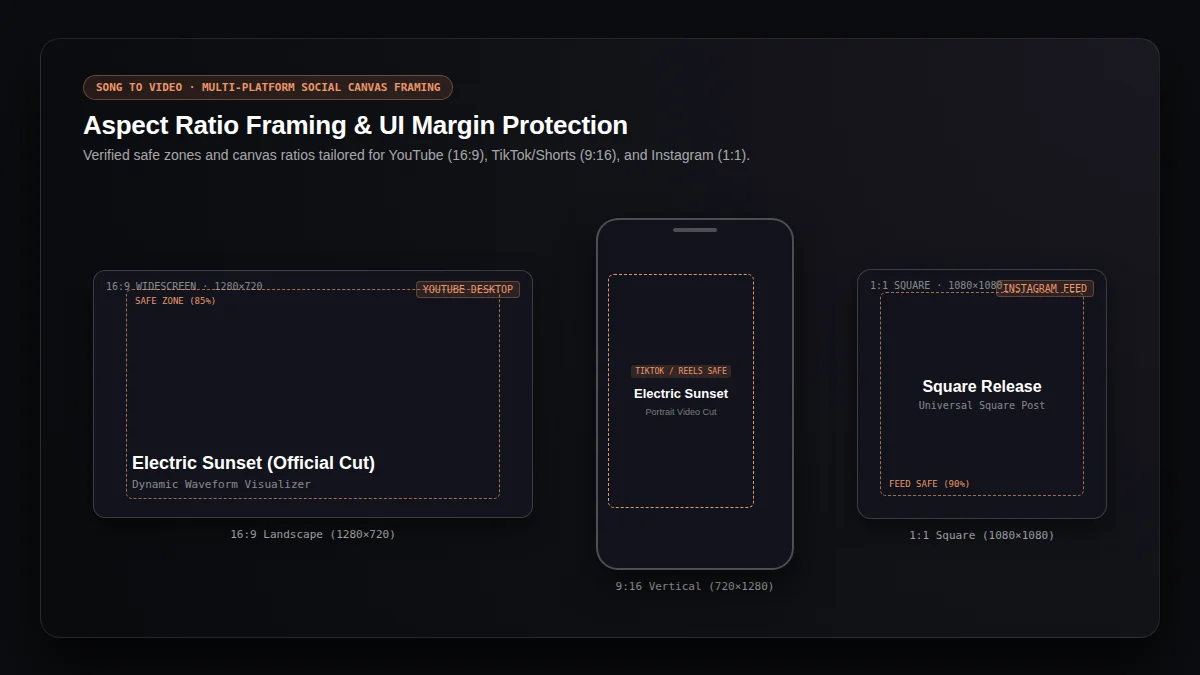
Fig 2: Social media safe zones and canvas overlay margins
How Do You Convert a Song to Video in Three Simple Steps?
Creating a song to video file takes only moments in your browser. With zero cloud waiting queues and no software installation required, this song to video workflow lets you move from a raw audio song recording to a completed export effortlessly.
01 / Upload Song & Cover Art
Drop any audio song file in MP3, WAV, FLAC, or M4A format into the editor. Add optional cover art and enter your official song title and artist credits for the canvas display.
02 / Trim Song Excerpt & Pick Ratio
Use the interactive timeline sliders to pick the exact song passage you want to share. Select your preferred song to video canvas ratio between widescreen, vertical, or square.
03 / Preview & Export Song Video
Play an instant browser preview of your song composition. When satisfied, click export to render a crisp MP4 or WebM song to video file directly on your local device.
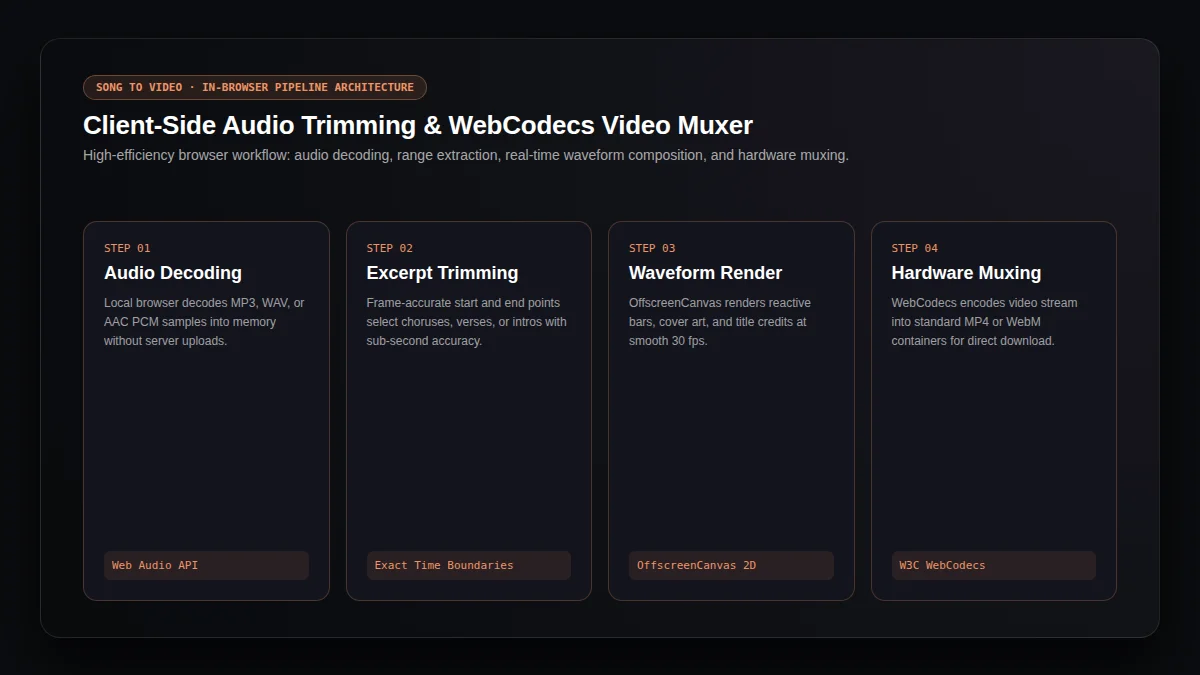
Fig 3: In-browser client-side WebCodecs and Web Audio pipeline architecture
Why Is In-Browser Processing Faster and Safer for Song to Video?
Traditional online converters send your song audio to remote servers, raising privacy issues and forcing you to wait in shared rendering queues. Our browser-first engine uses modern WebCodecs and Web Audio technology to decode, synthesize, and export your song to video clips 100% on your local machine.
"WebCodecs provides low-level access to built-in audio and video encoders and decoders, enabling hardware-accelerated media rendering directly within web applications without server dependencies."
100% Private On-Device Processing
Your private unreleased song tracks, demos, and master stems never leave your device. Adapting a song to private media runs entirely inside your browser memory for maximum creative security.
Hardware-Accelerated Speed
By leveraging local GPU canvas rendering and native browser video muxing, our song to video tool avoids server bottlenecks and exports smooth 30 fps media in seconds.
Frequently Asked Questions: How Does Song to Video Work?
Find straightforward answers about song to video formatting, browser compatibility, privacy protections, and export options.
Is this song to video converter free to use?+
Yes. Our song to video converter is completely free with no limits. You can create as many song clips as you want without registering an account, purchasing credits, or receiving watermarks.
Can I choose any duration or excerpt for my song to video clip?+
Yes. You have full control over start and end points. You can export a quick 15-second teaser, a 30-second chorus preview, or longer song sections in your render as device memory allows.
Does song to video upload my music files to a server?+
No. The song to video tool processes all audio samples, waveforms, and video frames locally inside your browser. No song audio or artwork is ever transmitted across the internet.
Which output video formats does song to video produce?+
The tool exports standard H.264 MP4 media when supported by your browser, or high-efficiency WebM as an alternative. Both formats provide universal playback for social uploads.
How does song to video differ from AI music video generation?+
A song to video workflow takes an existing song recording and packages it with cover art and reactive waveform visualizers. In contrast, an AI music video generator creates multi-scene cinematic visual stories with AI storyboard synthesis.
Explore Related Audio and Music Video Tools
Discover more browser-first audio tools and AI music generation capabilities across our creative studio.
Audio to Video
Turn audio and a cover image into a waveform video in your browser.
MP3 to MP4 Converter
Package lossless audio files with static cover artwork into video containers without re-encoding.
lyrics video maker
Synchronize timed lyrics with audio tracks for dynamic subtitle music videos and karaoke clips.
AI Music Video Generator
Transform your audio into cinematic beat-driven AI video scenes and stylized narrative visuals.
AI Music Generator
Generate full-length original songs with vocals and melodies from simple descriptive text prompts.
AI Song Cover Generator
Re-interpret existing songs with new vocal timbres, style prompts, and fresh genre arrangements.
MiniMax Music 3 Guide
Explore production prompts, style keywords, and acoustic benchmarks for the Music 3 model.